

Connect an AI assistant
Let Claude, Cursor or another AI assistant read your Land Your Home chains, stages and QR codes.
You can connect an AI assistant to your Land Your Home account so you can ask it questions about your property chains in plain language, such as "What tasks are overdue?" or "How many scans did my For Sale board get this week?"
The assistant can read your data. It can't change anything: it can't complete a stage, send an invite or edit a QR code.
Land Your Home also has an assistant of its own, Lodge, so you don't need to connect anything to ask questions.
What you need
- A paid Pro, Max or Enterprise licence applied to your account. The 14 day free trial doesn't include this, and neither does a licence that is sitting unassigned in team features.
- An AI assistant that supports connecting to a remote MCP server (Model Context Protocol), such as Claude, Claude Code or Cursor.
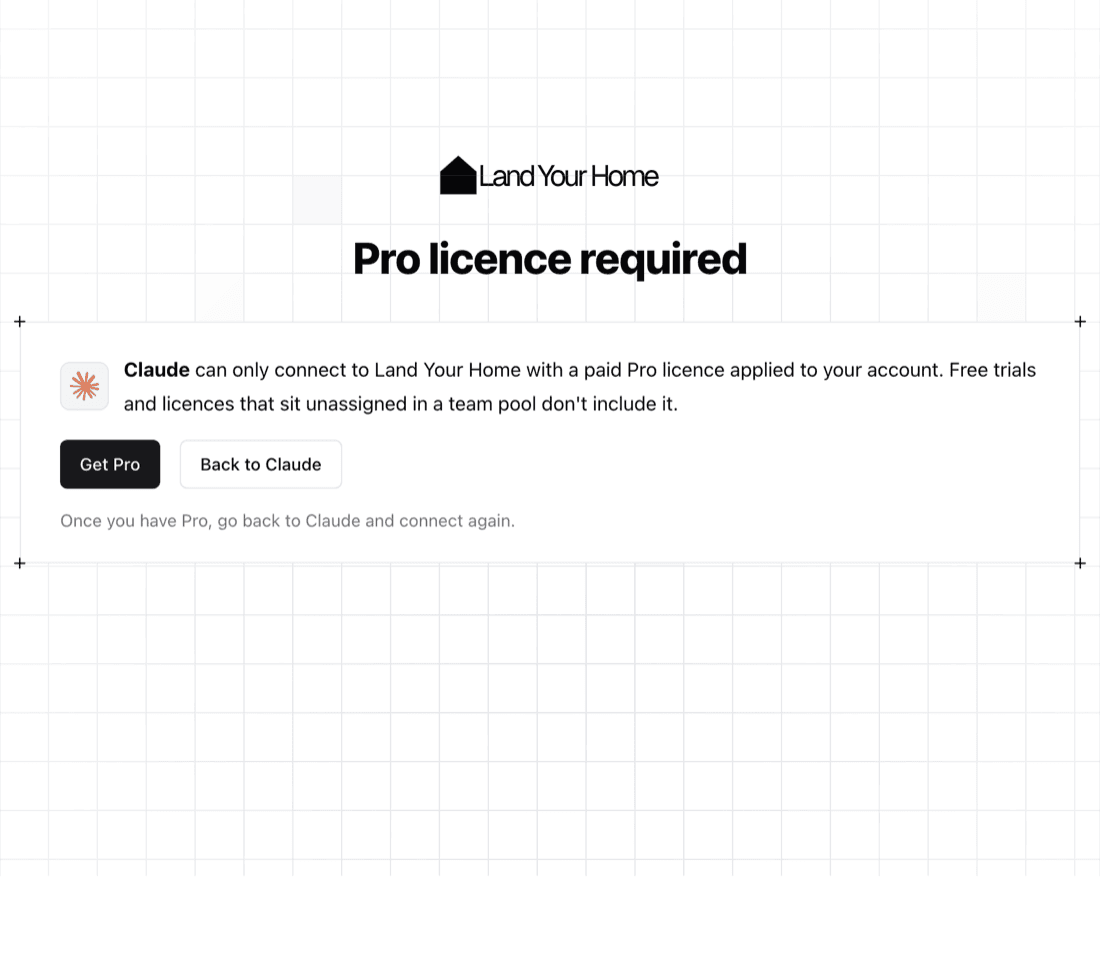
If you don't have Pro, Max or Enterprise, the approval screen tells you so and links to the plans instead of letting you approve a connection that wouldn't work.
The address to add
Every assistant asks for the same address:
https://mcp.landyourhome.co.uk/mcpConnect your assistant
Claude (claude.ai and the Claude apps)
- Open Settings, then Connectors.
- Choose Add custom connector.
- Enter a name (for example Land Your Home) and the address above, then add it.
- Choose Connect. You'll be sent to Land Your Home to sign in and approve the connection.
Claude Code
Run this in your terminal:
claude mcp add --transport http land-your-home https://mcp.landyourhome.co.uk/mcpThen run /mcp inside Claude Code, pick land-your-home and choose to authenticate. Your browser opens so you can sign in and approve.
Cursor
Add the server to your Cursor MCP settings (~/.cursor/mcp.json, or .cursor/mcp.json in a project):
{
	"mcpServers": {
		"land-your-home": {
			"url": "https://mcp.landyourhome.co.uk/mcp"
		}
	}
}
Cursor will then open your browser to sign in and approve.
ChatGPT
A ChatGPT app is on its way. This page will be updated when it is available.
Other assistants
Any assistant that supports remote MCP servers with sign-in (OAuth) can connect with the address above. It registers itself with Land Your Home when you connect, so you don't need a client ID or secret.
The approval screen
When you connect, you're taken to an Authorise access screen on Land Your Home. It shows:
- the name of the assistant asking for access, and where you are connecting from;
- what it will be able to read: your property chains, transactions and the people on them, stages and tasks including due dates, properties, invites, access requests, notifications, your name and contact details, and your Adaptive QR codes with their scan counts and change history;
- that it can't change any of that.
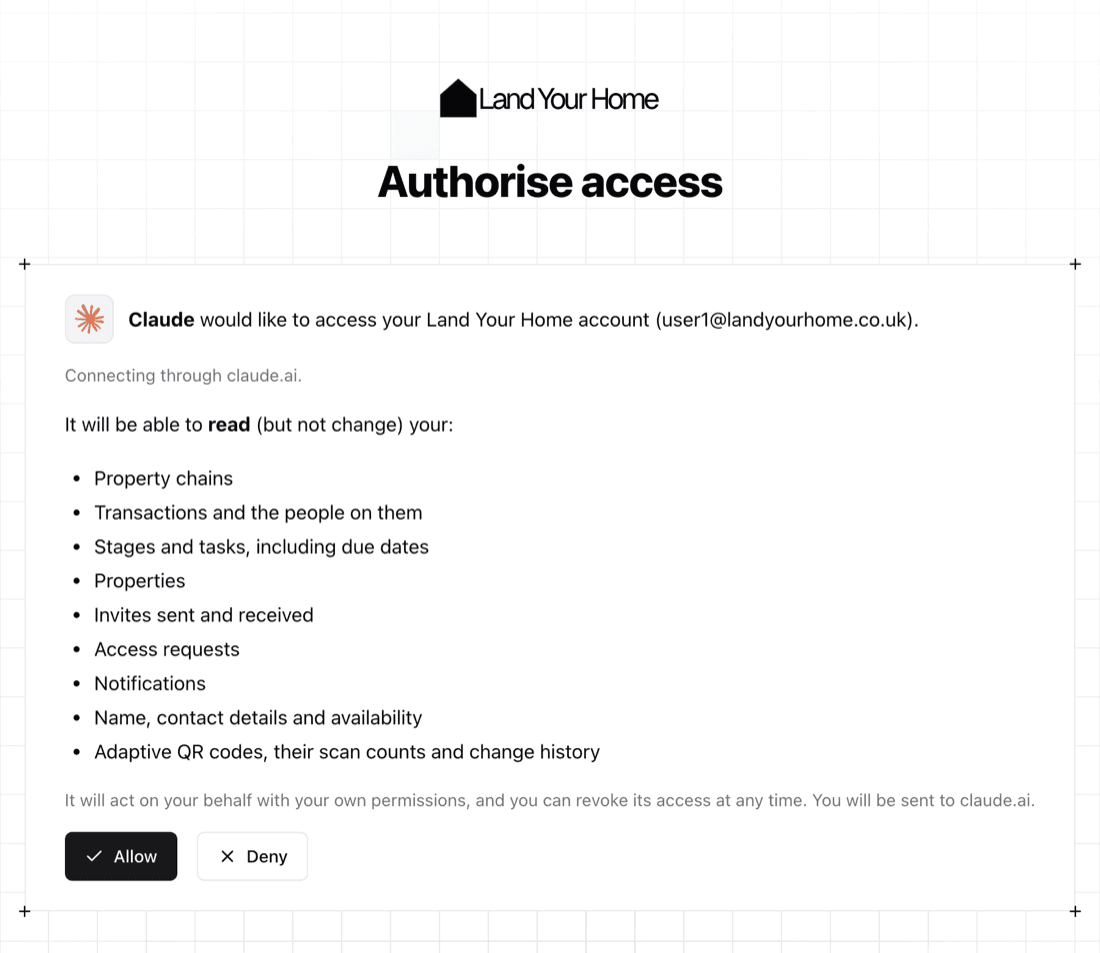
Claude and ChatGPT are recognised by the address they connect from, so they are shown by name with no warning.
Any other assistant, such as Cursor, is shown with a warning that it registered itself automatically and hasn't been verified by Land Your Home, and the address you will be sent to. It means we haven't checked who is behind it, so only approve it if you have just started connecting it yourself.
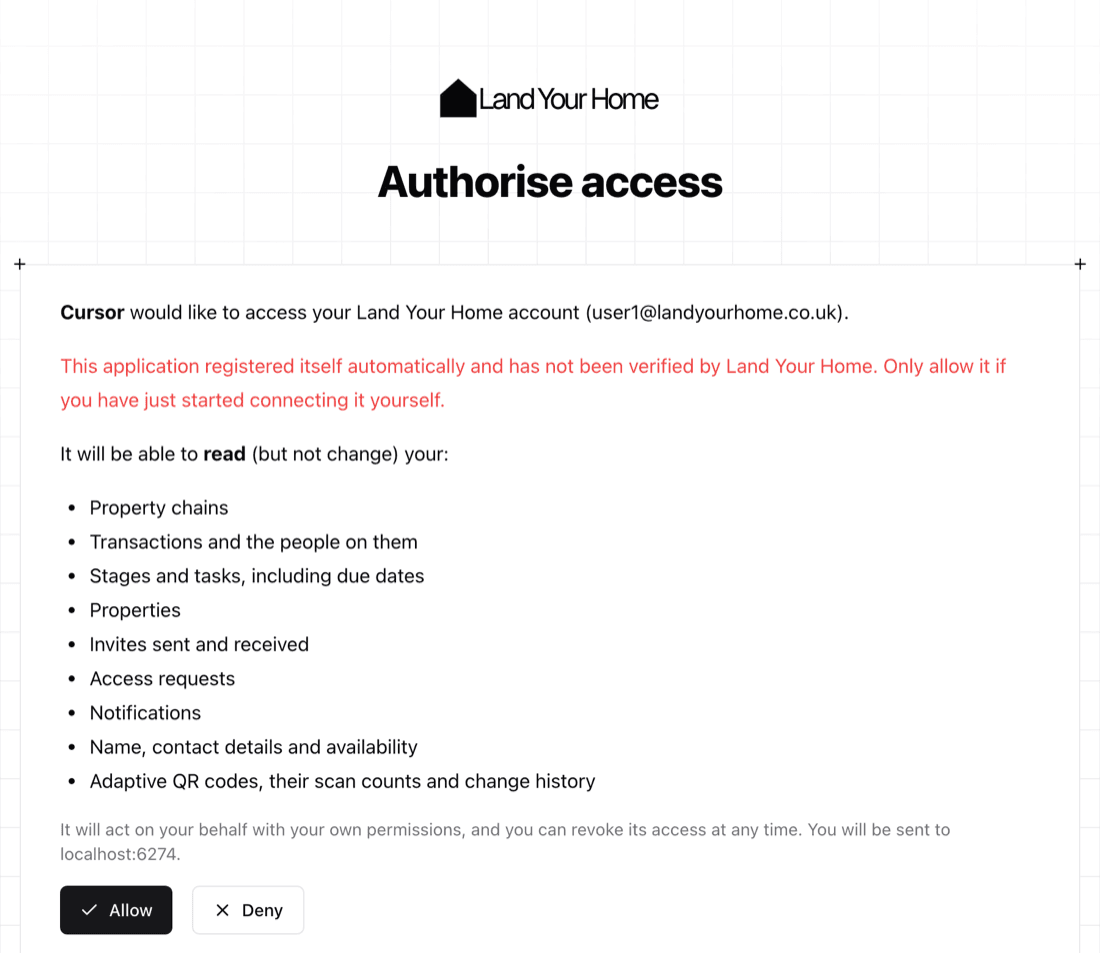
The assistant acts with your own permissions: it can only see what you can already see in Land Your Home.
If you need a Pro, Max or Enterprise licence
If your account doesn't have a paid Pro, Max or Enterprise licence applied, the screen says so instead. Choose a plan takes you to checkout, and when you've paid, the confirmation page has a button straight back to the assistant. Back to Claude (or your assistant's name) returns you without connecting.
What you can ask
The assistant can look up:
| It can read | Example question |
|---|---|
| Your tasks | "What tasks are overdue?" "What am I waiting on?" |
| Your chains and transactions | "Show me where each of my chains is up to." "List all my transactions." |
| People on a transaction | "Who is the solicitor on the Elm Road sale?" |
| Stages | "Which stages are due this week?" |
| Properties | "List the properties I'm involved in." "Which of my properties is in Liverpool?" |
| Invites and access requests | "Do I have any invites waiting?" |
| Notifications | "What's new since yesterday?" |
| Your profile and availability | "What contact details do I have on my profile?" |
| QR codes | "How many scans did my For Sale board get this week?" "When did this QR code's link last change?" |
Scan statistics are totals only. The assistant never sees who scanned a code.
Disconnect an assistant
You can disconnect an assistant at any time:
- Open your user settings.
- Find Connected Apps.
- Choose Disconnect next to the assistant and confirm.
The assistant can't get new access after that, and has to ask for your approval again to reconnect. A connection it has already made may keep working for up to an hour before it expires.
Privacy
When an assistant reads your data, that data becomes part of your conversation with the assistant, so it is handled under that assistant's own terms and privacy policy as well as ours. Free text that you or other people have written in Land Your Home, such as stage notes and names, is passed to the assistant when it's relevant to your question. Only connect assistants you trust, and disconnect any you no longer use.
- What it receives: only what you could already see, from the list under What you can ask. Contact details and prices are only returned where your role and each person's sharing settings allow. It never receives payment card details, health data, government ids or credentials.
- Why: only to answer your own questions, at your request.
- What we keep: a log of which tool was called, by which account and assistant, when, and whether it worked. Never what was asked or what came back.
- Your controls: disconnect the assistant in Connected Apps, or deactivate your account.
Read the Land Your Home privacy policy and terms of service for the full detail.
Lodge, the assistant in Land Your Home
Lodge is an assistant built into Land Your Home, for accounts with a paid Max or Enterprise licence. Open it from the button in the corner of the page and ask in plain language, such as "Where is my chain stuck?" or "What does exchange of contracts mean?"
Lodge is being rolled out gradually. If you have Max and don't see the button yet, it isn't switched on for your account.
What Lodge can do
- Answer about your own data: your chains, transactions and the people on them, stages and tasks, properties, invites, notifications and QR codes, with the same permissions you have. It reads your data and never changes it.
- Explain Land Your Home and what property-buying terms and steps mean, in plain English. That's general information, not legal or financial advice.
- Ask which one you mean when a question could be about several of your chains or properties.
Lodge only helps with Land Your Home. It politely declines anything else, such as writing, coding or general knowledge questions, and it won't reveal how it has been set up.
Things to know
- Check what matters. Lodge is an AI and can be wrong. For anything you'll act on, such as a date or a name, check it against the stage or transaction it came from.
- It reads what others have written. Notes and names on a chain are written by the people on it. Lodge treats them as information and does not follow instructions in them, and links it writes are limited to pages in Land Your Home.
- Your details. If you've chosen to hide your personal information from assistants in your user settings, Lodge leaves yours out too.
- A daily allowance. There's a generous limit on how many messages you can send in a day, so the assistant stays available for everyone.
- Conversations are kept for 30 days. They're saved to your account so you can come back to them, and only you can see them. Each one is deleted automatically 30 days after its last message, so copy out anything you need to keep.
Privacy
Lodge is run by Land Your Home. To answer, your messages and the data they need are sent to AI model providers that act for us and have agreed not to keep them or use them to train models. We keep a log of use (which account, when, how many tokens and whether the message was answered) and never what was asked or answered. The privacy policy has the detail, including how to have conversations deleted sooner.
Need help?
Email hello@landyourhome.co.uk or use the contact page. Land Your Home is a service of Designibl Ltd.